What VO3 AI is
VO3 AI is a web studio that gives you access to many AI video models through one account. It does not train its own frontier model. Instead it connects to Google Veo 3.1, OpenAI Sora 2, Kuaishou’s Kling 3.0, ByteDance’s Seedance, Alibaba’s Wan, MiniMax and Google’s Gemini Omni, and bills you in its own credits.
The name is a play on Google’s Veo 3. That causes confusion, so it is worth being clear. VO3 AI is built by a company called CodeFashion. Its footer says it is not affiliated with or endorsed by Google, OpenAI or any model provider. When you generate a “Veo” clip here, VO3 AI passes your prompt to Google’s model and hands you the result.
On top of the models it adds its own tools: an AI agent called Vovoo, script-to-video, a long-video editor, voiceover, trend templates and image generation. It also runs a couple of in-house model options called VO3 Basic and VO3 Advance. Its own credit page labels these as based on Hailuo-02 and Seedance.
VO3 AI is the second most-clicked text-to-video tool among our readers, behind PixVerse.
Who it is for
VO3 AI fits you if:
- You want to compare Veo, Sora, Kling and Seedance without opening four accounts.
- You do not have, or do not want, a Google AI subscription just to try Veo.
- You like the idea of a chat agent that writes prompts and picks a model for you.
- You make ads, promos or social clips and want a long-video editor in the same place.
Skip it if:
- You want to try before you pay. There is no free plan.
- You only use one model. Going direct to that model’s maker is usually cheaper and gets new features first.
- You need private output on a budget. Lite and Basic videos default to public.
- You want clear, consistent pricing. VO3 AI’s pages contradict each other in several places, which we cover below.
How it works
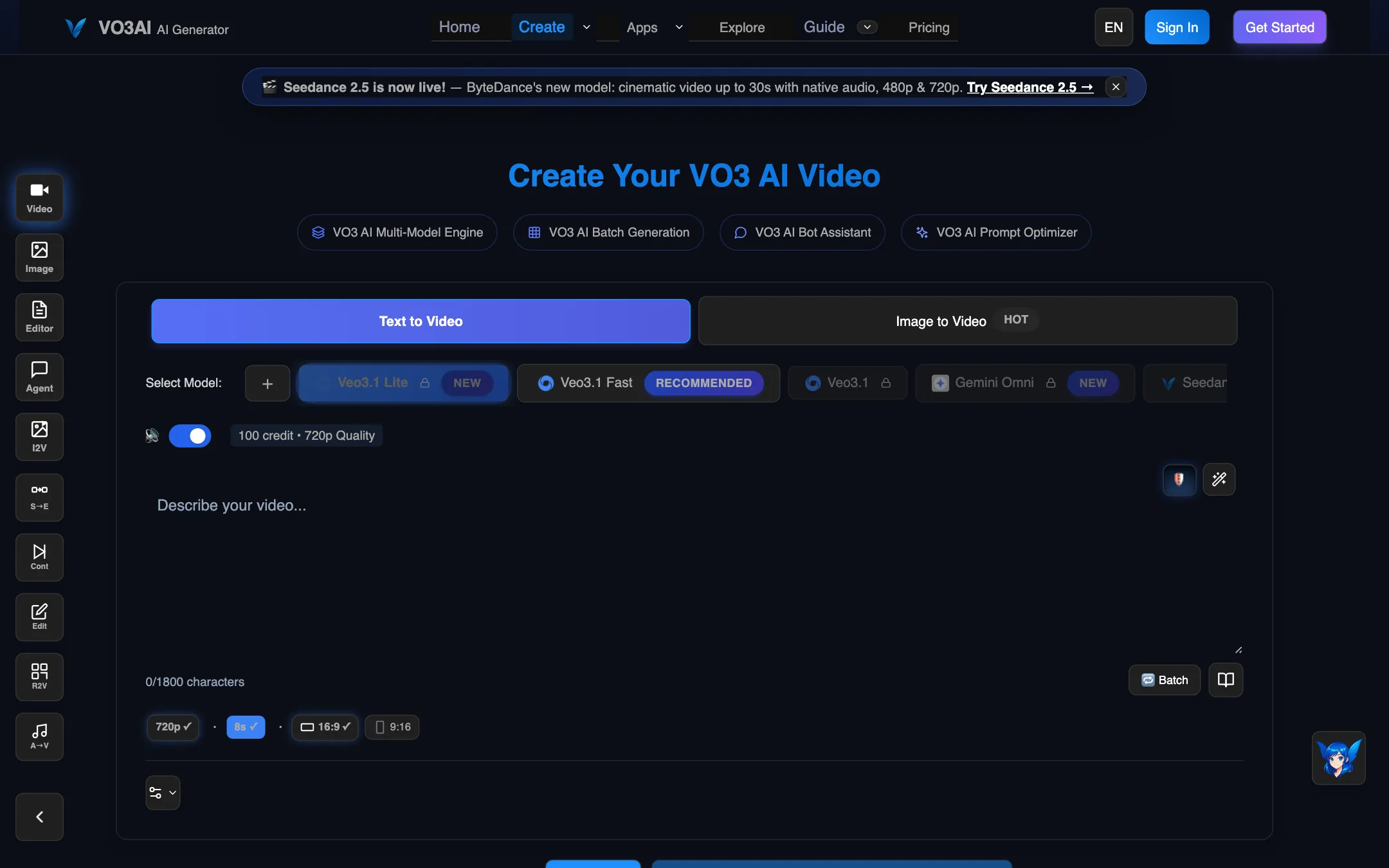
The create page has a model row along the top. Click a model and the line under it updates with the credit cost and resolution. For Veo 3.1 Lite, the default, it showed “100 credit, 720p Quality.” Below sits a prompt box with an 1,800-character limit, then chips for resolution, duration and aspect ratio (16:9 or 9:16), and a Batch button.
The model list on our check was long: Veo 3.1 Lite, Veo 3.1 Fast, Veo 3.1, Gemini Omni, Seedance 2.5, Wan 2.7, Seedance 2.0, VO3 Basic, Kling 2.6 Pro, Kling 3.0, Seedance 2.0 Mini, MiniMax H3, Wan 3.0, Sora 2 Basic and Pro, VO3 Advance and Seedance 2.0 Fast. Not every plan gets every model. Lite is limited to the cheaper ones, Basic adds Kling 3.0, Veo 3 and Seedance 2.0, and only Max unlocks MiniMax H3.
A typical text-to-video run
- Choose Text to Video or Image to Video at the top.
- Pick a model. Start with Veo 3.1 Lite or Veo 3 Fast while you test prompts, since they are the cheapest.
- Write your scene. Name the subject, setting, action, camera move and sound.
- Set aspect ratio and resolution. The cost updates as you change them.
- Generate. VO3 AI lists most models at 1 to 3 minutes and Sora 2 at 3 to 8 minutes.
- Extend with Continue Scene, or pull clips into the long-video editor.
A left-hand rail switches between the other tools: image generation, the editor, the agent, image-to-video, start-to-end frame, continue, edit, reference-to-video and audio-to-video.
Vovoo, the agent
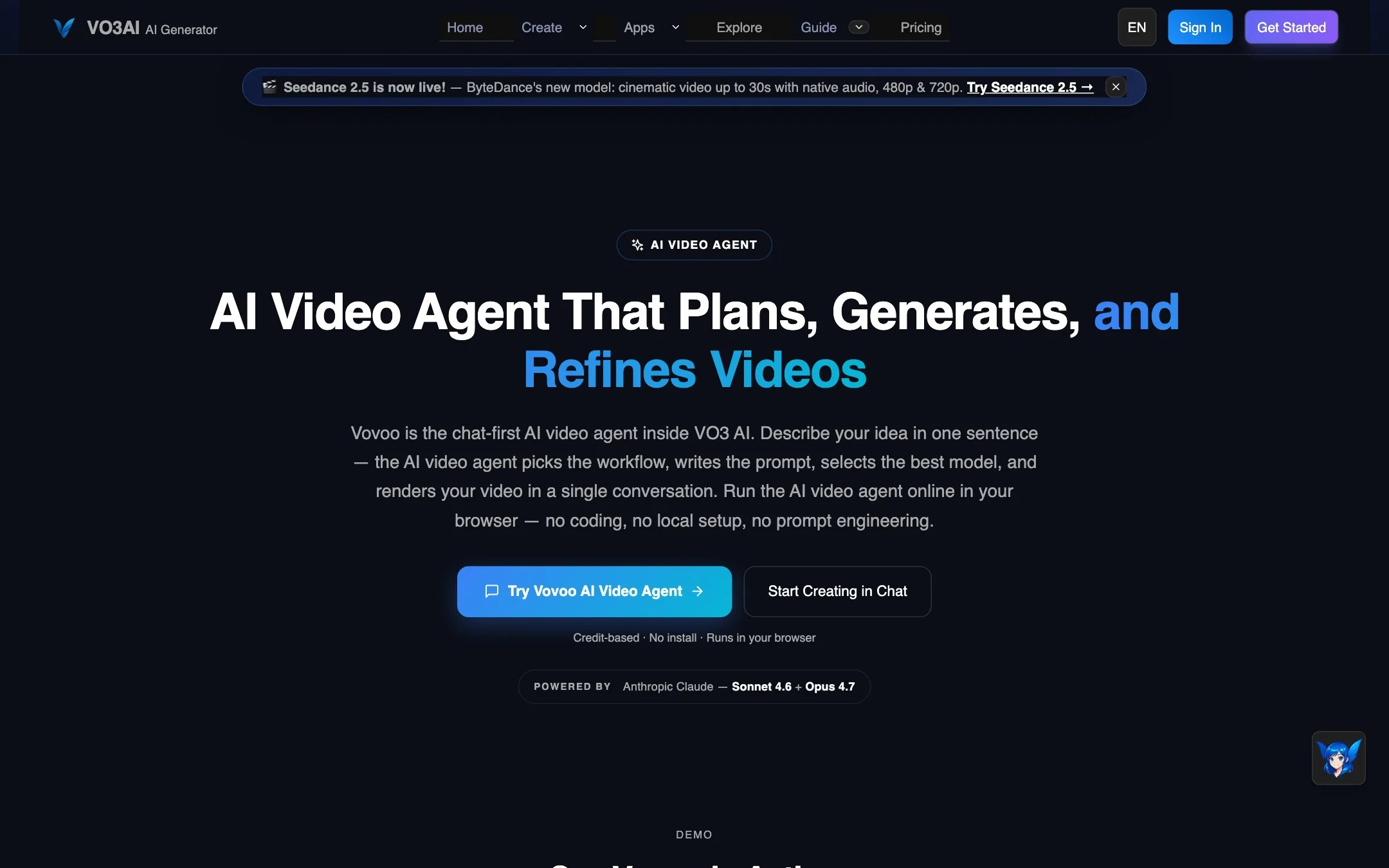
Vovoo is a chat interface. You describe what you want in a sentence and it plans the steps, writes prompts, picks a model and stitches the result. VO3 AI shows a demo where a one-line brief for a 15-second projector ad becomes a five-step plan: ad angle, script, four-shot storyboard, generated segments and a merged cut.
VO3 AI says the planner runs on Anthropic’s Claude Sonnet 4.6 and Opus 4.7, and that it routes jobs across Veo, Sora, Kling, Seedance, Hailuo and Hunyuan. We did not run the agent, so we cannot tell you how well its plans hold up. Agent runs use credits for every clip they generate, so a single brief can cost several videos’ worth.
Longer videos
Most models here make clips of 4 to 15 seconds. VO3 AI offers three ways to go longer:
- Continue Scene extends a clip from its last frame.
- First and last frame generates the motion between two images you upload.
- Long Video Editor merges, trims and reorders clips into a 1 to 3 minute video.
There is also script-to-video. Paste a script and VO3 AI splits it into scenes, generates each one and merges them. It says there are more than 50 templates to start from.
Output quality
Because VO3 AI resells other companies’ models, output quality is mostly the quality of the model you pick. A Veo 3.1 clip here should look like a Veo 3.1 clip anywhere else, assuming VO3 AI passes the same settings through. We did not generate test clips, so we cannot confirm that.
A few things worth knowing from VO3 AI’s own tables:
- Resolution varies by model. Veo 3 Fast is listed at 768p. Veo 3.1 Lite is 720p. Kling 3.0 is listed at up to 4K. Seedance 2.0 is 720p only.
- Length varies by model. Veo clips are 8 seconds. Kling and Seedance offer 5, 10 or 15 seconds. Sora 2 runs from 4 to 15 seconds.
- Audio is not universal. VO3 Basic and VO3 Advance have no audio. Most of the others include it or make it optional.
- Generation time is listed at about 1 minute for Veo 3 Fast and up to 8 minutes for Sora 2 Basic.
VO3 AI’s FAQ claims it has “superior human motion generation” and better prompt following than Sora and Runway. Treat that as marketing. The models doing the work are the same ones you can use elsewhere.
Pricing
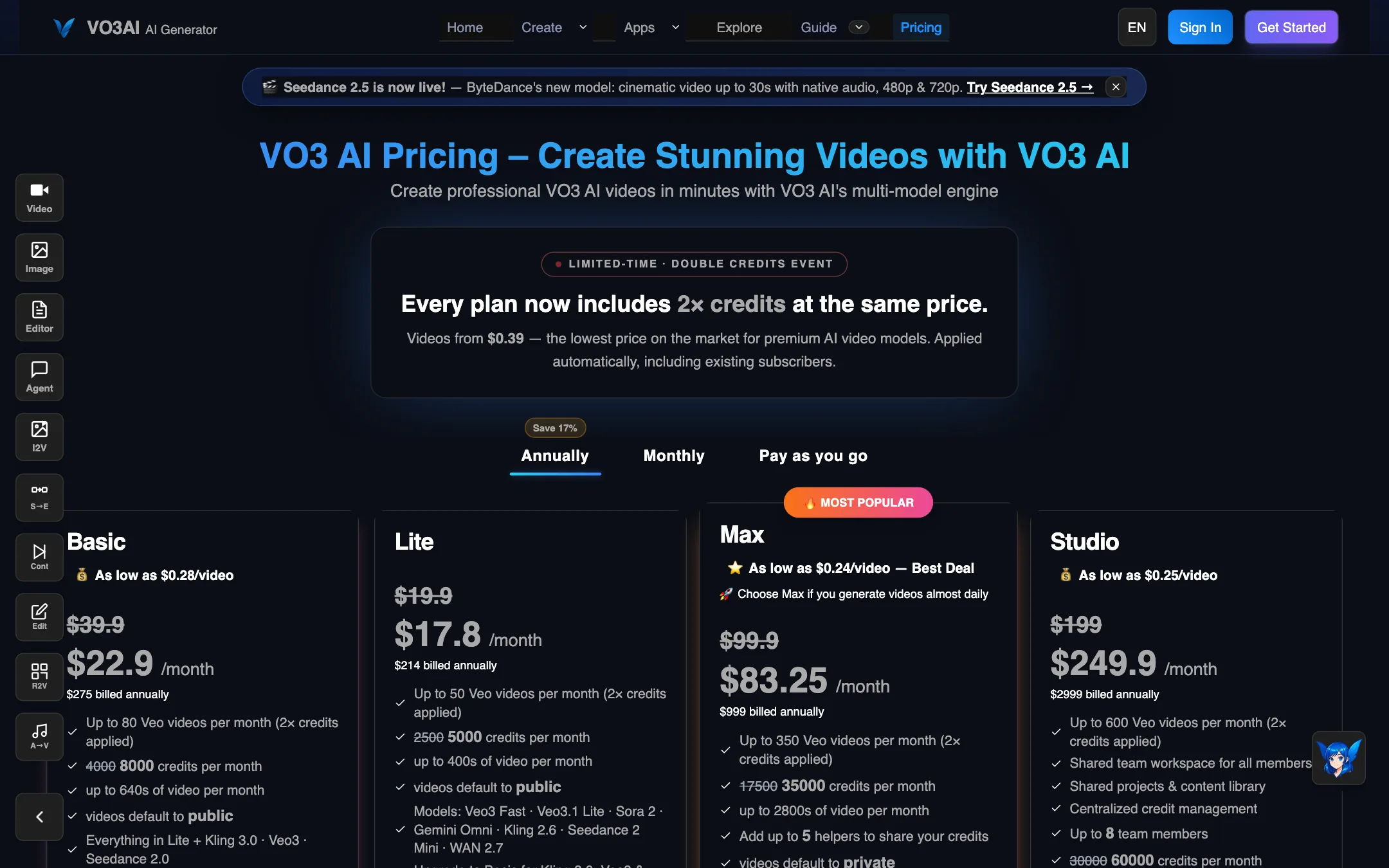
VO3 AI runs on credits. Each plan gives you a monthly credit allowance, and each model costs a set number of credits per clip. On our check, VO3 AI was running a “double credits” event, so every plan’s credits were shown doubled at the same price.
| Plan | Price | Credits (doubled) | Notable |
|---|---|---|---|
| Lite | $17.80/mo yearly, $19.90 monthly | 5,000 | Cheaper models only, public by default |
| Basic | $22.90/mo yearly, $39.90 monthly | 8,000 yearly, 12,000 monthly | Adds Kling 3.0, Veo 3, Seedance 2.0 |
| Max | $83.25/mo yearly, $99.90 monthly | 35,000 | All models, 5 helpers, private by default |
| Studio | $249.90/mo yearly, $199 monthly | 60,000 | Team workspace, 8 members |
One-time packs: Flex Pack at $59.90 for 10,000 credits, Max Pack at $129 for 30,000, and Flex Ultra at $239 for 60,000. Pack credits never expire. Prices were checked on 2026-10-19.
What the pricing page does not make obvious
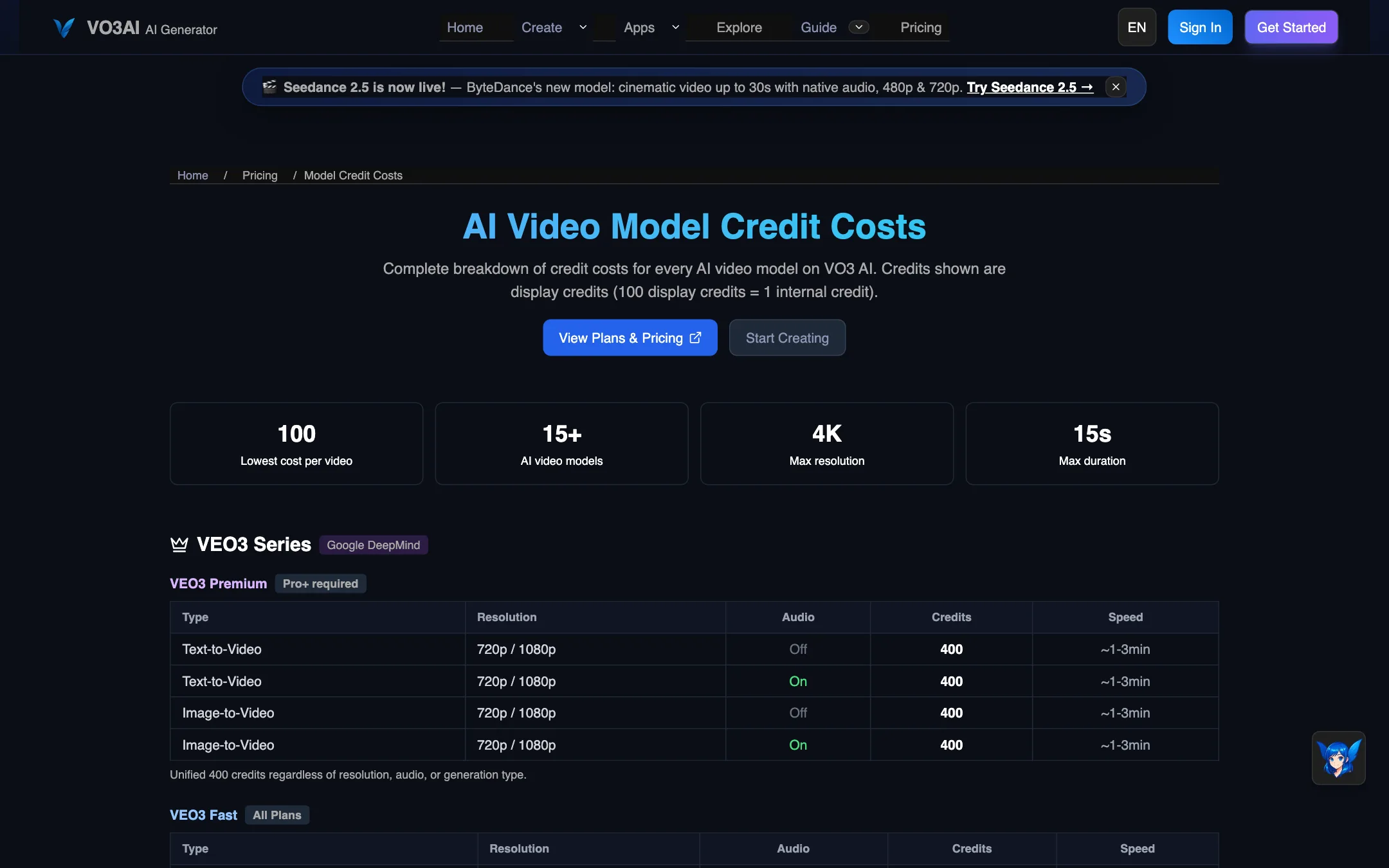
- The credit tables disagree. The main pricing page lists Veo 3 Premium at 800 credits and Veo 3 Fast at 200. The separate model credit page lists the same models at 400 and 100. The generator showed 100 credits for Veo 3.1 Lite. Trust the number in the generator, not either table.
- A “Pro” plan is referenced but not sold. Veo 3 Premium and Sora 2 are marked “Pro+ required,” and the FAQ talks about Pro helpers, but there was no Pro plan on the page. The refund policy also names Basic, Pro and Ultra plans. The site seems to have renamed plans without updating everything.
- Studio is cheaper monthly. The yearly Studio price showed $249.90 a month ($2,999 a year), while monthly billing showed $199. Double-check before you pay yearly.
- Basic gets more credits on monthly billing. Monthly Basic showed 12,000 credits, yearly Basic 8,000.
- The double-credits event is temporary. When it ends, expect half the credits shown above for the same price.
- Public by default. Lite and Basic videos default to public. Change the setting per video if you need privacy.
Refunds
VO3 AI’s refund policy is strict. Subscriptions can be refunded within 7 days only if you have generated very few videos (the policy lists 5 for Basic). Small credit packs of 10,000 credits or fewer can be refunded within 48 hours if completely unused, minus a 3% fee. Larger packs are never refunded. You get one refund per account, ever. Failed generations get credits back, and VO3 AI promises three free regenerations a month for results you are unhappy with.
Be aware that VO3 AI’s own Veo 3 pricing guide promises a “30-day money-back guarantee.” The refund policy linked from the checkout says 7 days with usage limits. If the two conflict, the policy page is the one you agree to at checkout, so plan around the stricter terms.
Our advice: start with the cheapest plan, run your exact use case on the cheap models, and only move up when you know what you need.
Verdict
VO3 AI is a convenient way to use several of the best video models from one place. The model table is useful, the agent and long-video editor add real workflow on top, and credit packs suit people who do not want a subscription.
The trade-offs are real. There is no free plan, you pay a reseller’s margin, and the pricing pages are inconsistent enough that you should verify every cost in the generator itself. If you mostly use Veo or Kling, compare the price of going direct. If you want to try a lot of models without juggling accounts, VO3 AI does that job.