
What SendShort is
SendShort is a web app that turns long videos into short vertical clips. You give it a YouTube link or a file. It picks the moments it thinks will hold attention, cuts them, adds captions and B-roll, and lets you schedule the results to TikTok and YouTube.
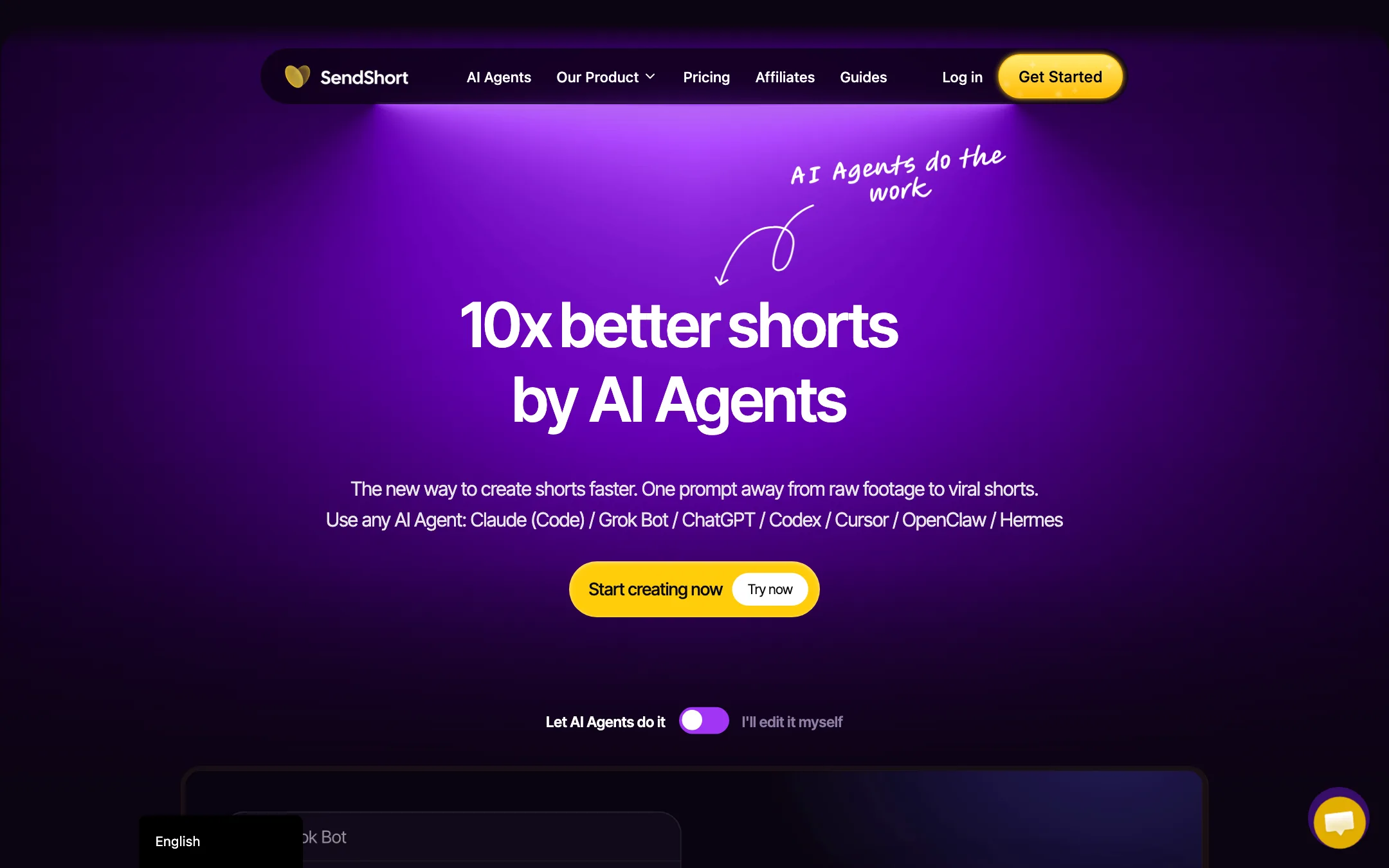
That is the core job, and it is the same job Opus Clip, Klap and a dozen other clippers do. SendShort tries to stand out in two ways. First, it bundles a lot more around the clipper: faceless videos from a prompt, TikTok slideshows, music videos, AI avatars, a timeline editor and a content calendar. Second, it has gone all in on AI agents. Its homepage now leads with the idea that you can paste a link into Claude, ChatGPT or Grok and get finished shorts back without opening the app.
SendShort is run by PXCH Holding I, LLC and is available in English plus about ten other interface languages. It also sells a done-for-you upload service on top of the software.
Who it is for
SendShort fits you if:
- You record long content, like podcasts, webinars, livestreams or YouTube videos, and want a steady stream of shorts from it.
- You want captions, light edits and scheduling in one tab instead of three tools.
- You already work inside an AI assistant or terminal and like the idea of clipping from there.
- You run an agency and want one workspace with unlimited social accounts.
Skip it if:
- You want to try before you pay. There is no free plan.
- You only need captions on clips you already edited. A dedicated caption tool such as Submagic, or the free captions in CapCut, may be all you need.
- You post mostly to Instagram or LinkedIn and want native scheduling there. SendShort’s scheduler covers TikTok and YouTube only.
- You are on a tight budget and need AI clipping. The $15 Starter plan does not include it.
How it works
SendShort gives you two ways in: the web app, and an AI agent connection. The homepage literally splits them into “Let AI Agents do it” and “I’ll edit it myself.”
In the web app
SendShort describes the basic flow in three steps in its FAQ:
- Import a video. Upload a file or paste a YouTube link.
- Let the AI create shorts. It scores the recording, picks moments, cuts them and adds captions, B-roll, zooms and transitions.
- Review, edit and export. Tweak clips in the editor, then download or schedule them.
The pitch, in SendShort’s words, is that “you never open a timeline.” You review four or five suggested clips instead of scrubbing through an hour of footage. When you do want control, there is a full editor with a timeline, hooks, fonts and brand kits.
Beyond clipping, the app can build videos from scratch:
- Faceless videos from a text prompt, with AI images and voice-over.
- TikTok slideshows, a format many niche accounts use for list and story posts.
- Music videos, AI avatar videos and photo to video on the higher plans.
- Automated series that keep generating new clips on a schedule once you set them up.
From an AI assistant
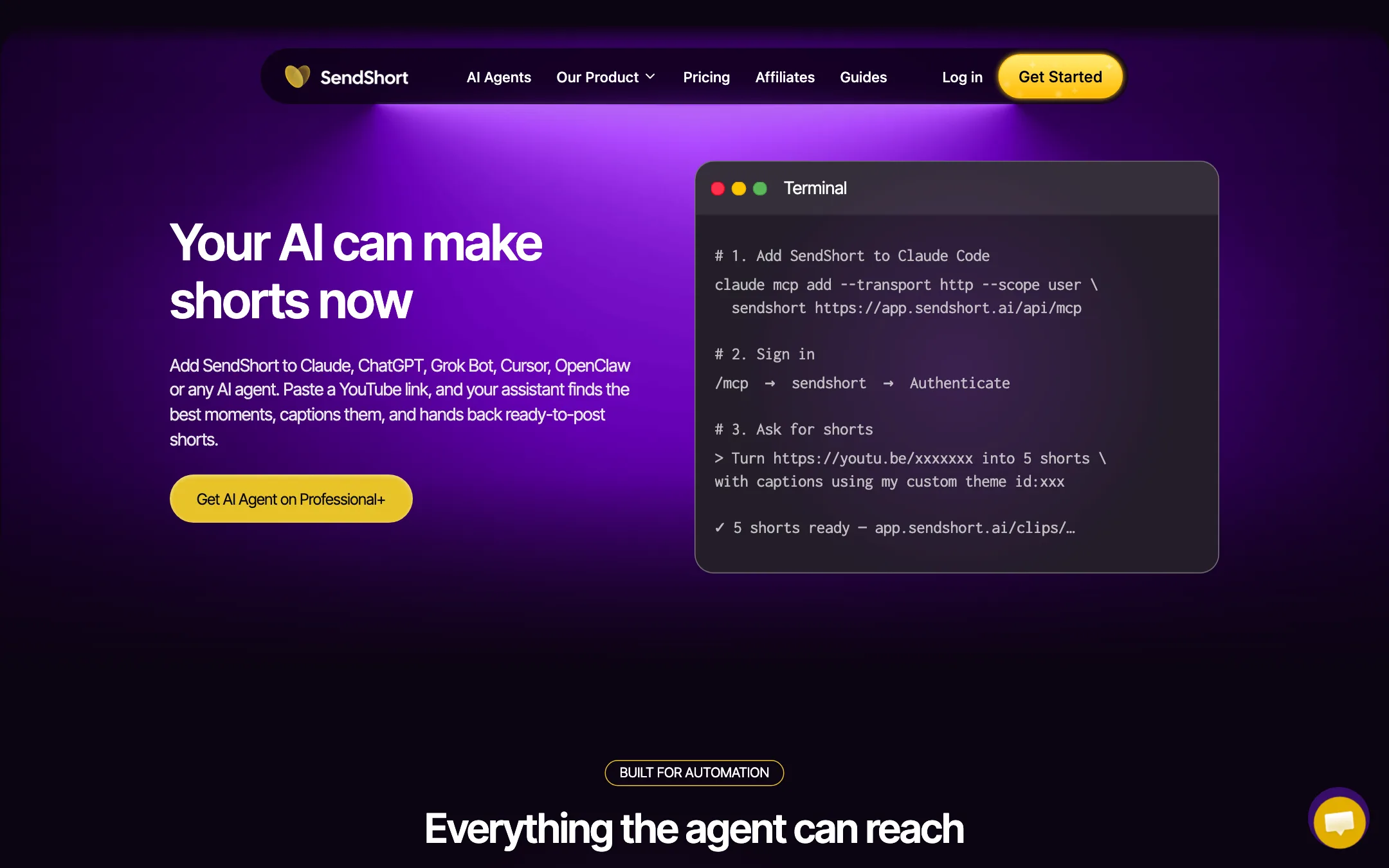
This is the newer and more unusual part. SendShort runs an MCP server, the open protocol many AI assistants use to call outside tools. According to its AI Agent page, you add the connector to Claude Code, Claude Desktop, ChatGPT, Grok, Cursor or another assistant, sign in, and then ask in plain language: “Turn this YouTube link into 5 shorts with captions.”
SendShort says the connector exposes four tools: import a video, find moments, add captions and render. Each returns structured data, so the assistant can check its own work. You can also give an agent a schedule so it clips new episodes as they land. Finished clips land in your SendShort workspace, where you can still edit them.
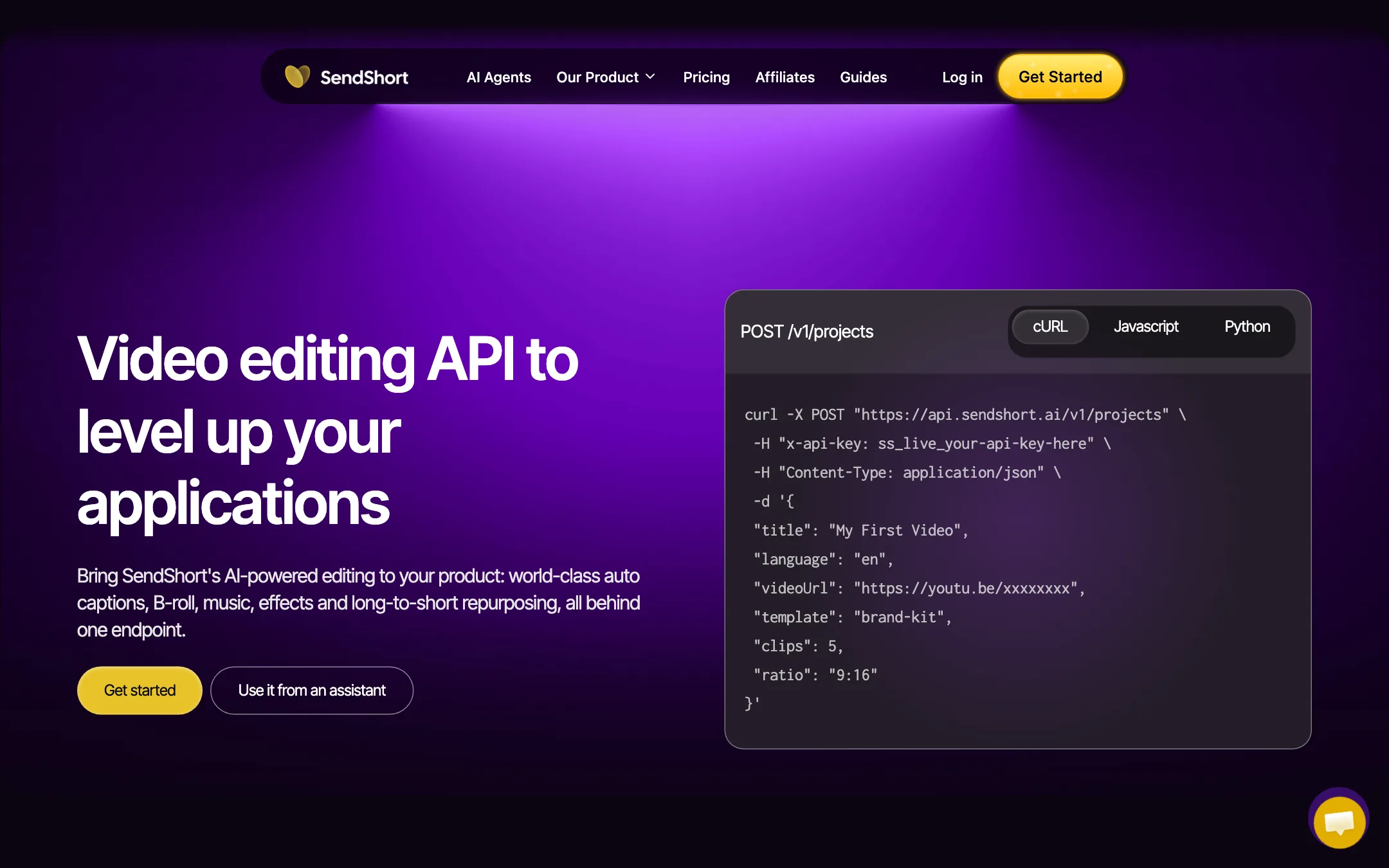
The same engine is available as a REST API for developers who want clipping inside their own product. You send a video URL, a clip count, an aspect ratio and a caption template, then poll for results or receive a webhook.
Whether you need any of this depends on how you work. If you already live in Claude or ChatGPT all day, it removes a step. If you just want to clip one podcast a week, the web app is simpler.
Captions and editing
Captions are where SendShort overlaps most with caption-first tools, which is why we also list it under captions and subtitles.
What SendShort says you get:
- Auto captions in 100+ languages. It claims 98%+ accuracy on its homepage and API page. An older feature page says 97%. We have not measured it.
- Animated caption styles modeled on popular creator looks. Starter gets 3 custom themes, Professional and Business get unlimited.
- Caption translation so one clip can go out in several languages. Professional and up.
- SRT export for when you want the caption file itself, for example to upload to YouTube. Professional and up.
- Auto B-roll, zooms and sound effects placed where SendShort expects attention to drop.
- AI hook titles, the text overlay at the start of a short meant to stop the scroll.
- Silence cutting and noise reduction for talking-head footage.
Treat accuracy claims from any caption vendor as a starting point. Names, jargon and heavy accents trip up every speech-to-text engine. Always read your captions before posting.
Output quality
We have not run our own footage through SendShort, so we cannot tell you how good its clip picks are. Here is what the vendor says and what to watch for.
SendShort says its AI “watches the full recording, scores every moment for retention and cuts the clips worth posting.” That is how every AI clipper describes itself. In practice, clip pickers are good at finding self-contained moments with a clear statement or a laugh. They are weaker at knowing what your audience cares about, and they sometimes cut mid-thought. Expect to reject some suggestions and trim others.
On the technical side, the export limits are clear:
- Starter: 1080p at 30 fps, clips up to 90 seconds.
- Professional: up to 2K at 30 fps, clips up to 3 minutes.
- Business: up to 4K at 60 fps, clips up to 10 minutes, and conversion between 9:16, 1:1 and 16:9.
SendShort’s FAQ says clips export at the resolution they came in at, up to those caps, and render vertically at 1080x1920 by default. For TikTok, Reels and Shorts, 1080p vertical is all you need. The 2K and 4K tiers matter mainly if you also publish the clips somewhere larger.
Pricing
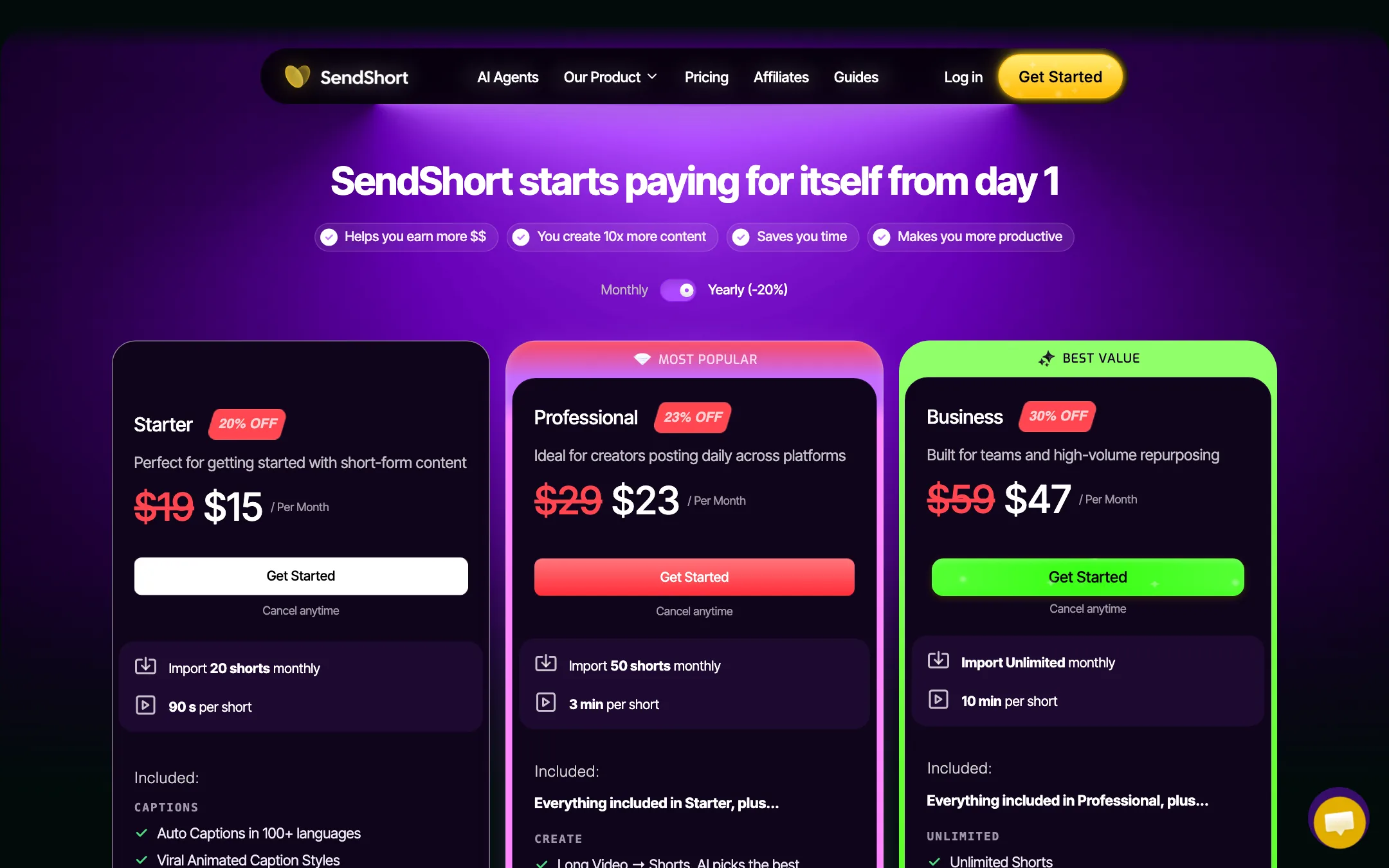
SendShort sells three plans. Yearly billing takes 20% to 30% off, depending on the plan. Prices below were read from sendshort.ai/pricing on 2026-10-19.
| Plan | Price | What you get |
|---|---|---|
| Starter | $15/mo yearly, $19 monthly | 20 shorts a month, 90 s max, captions, slideshows, faceless videos, scheduler, 1080p |
| Professional | $23/mo yearly, $29 monthly | 50 shorts a month, 3 min max, long video to shorts, B-roll, translation, SRT, AI agent and API, 2K |
| Business | $47/mo yearly, $59 monthly | Unlimited (100+ fair use), 10 min max, 4K 60 fps, ratio conversion, 10 automated series |
Things the pricing page makes clear if you read closely:
- Starter cannot clip long videos. “Long Videos to Shorts with AI” is listed under locked features. Starter is for captioning and editing clips you already have, plus slideshows and faceless videos. If you want AI to cut your podcast into shorts, Professional at $23 a month yearly is the real entry price.
- Every clip counts. A 60-minute podcast that becomes 8 clips uses 8 of your monthly shorts.
- Nothing rolls over. Monthly limits reset monthly. Slideshow and faceless limits reset weekly.
- “Unlimited” has a ceiling. SendShort defines it as 100+ shorts a month under fair use, and asks heavier users to contact them.
- There is no free trial. The pricing FAQ is explicit. You get a refund if you ask within 24 hours of paying.
One more inconsistency worth knowing: the homepage feature list says the API and AI Agent are Business features, while the pricing table includes “AI Agent for Claude, ChatGPT and Grok Bot, plus API” on Professional. The API page says you generate a key on Business. If agent or API access is the reason you are buying, confirm with support before choosing Professional.
Making your shorts allowance last
- Clip in one pass. Ask for the number of clips you actually plan to post, not the maximum. Every rendered clip counts.
- Reject early. Review suggestions before you render captions and B-roll on all of them.
- Use the yearly plan only once you know your volume. The savings are real, but there is no free trial to tell you whether the clip picks suit your content.
- Test inside the refund window. If you buy a monthly plan to try it, run your most typical long video through it on day one, while the 24-hour refund still applies.
Verdict
SendShort is a capable all-in-one shorts workspace. Clipping, captions, translations, B-roll, a timeline editor and a TikTok and YouTube scheduler all sit in one tab, and the AI agent connector is genuinely ahead of most rivals if you already work inside Claude or ChatGPT.
The pricing needs a careful read. Starter looks cheap at $15, but it leaves out AI clipping of long videos, which is why most people shop for a tool like this. Plan on Professional. And because there is no free plan, use the 24-hour refund window to test it on your own footage before you commit to a year.