What D-ID is
D-ID is an Israeli AI company that made its name with talking photos: upload a still portrait and the face starts speaking your script. That trick went viral years ago. Today D-ID sells a wider avatar platform with three parts:
- Video Studio, called Creative Reality Studio, for scripted avatar videos.
- Visual AI agents, real-time avatars that listen and talk back.
- An API that lets developers build both into their own products.
It sits in the same category as Synthesia, but it feels different. Synthesia is built around corporate training workflows. D-ID is cheaper at the low end, more flexible about faces, and much more focused on developers and live conversation.
Who it is for
D-ID fits you if:
- You want to try avatar video for a few dollars a month.
- You want to animate a specific photo, such as a founder headshot, a historical figure for a lesson, or a mascot.
- You are a developer building an avatar into an app, a support widget or a tutoring product.
- You want an AI agent with a face on your website, answering questions from your own documents.
- You already design in Canva and want presenter clips inside your designs.
Skip it if:
- You need a lot of video minutes each month on a small budget. Lite and Pro give 10 to 15 minutes.
- You need a full L&D toolset with SCORM, branching and approval flows. Synthesia is further along there.
- You want stylized or cinematic footage. That is a text-to-video generator’s job.
How it works
Creative Reality Studio
The studio is D-ID’s web editor for scripted videos. D-ID’s FAQ describes three ways to get a face:
- Pick a pre-made avatar.
- Upload a photo of a face.
- Generate a portrait from a text prompt with the built-in image generator.
Then you give the avatar a voice in one of three ways: type a script for text-to-speech, upload a recording, or use a cloned voice. D-ID’s older FAQ lists voice cloning as Enterprise only, but the current plan cards include one voice clone on Pro and three on Advanced, so go by the pricing page.
A typical run looks like this:
- Open the studio and choose an avatar or upload a portrait.
- Type or paste your script, or let the built-in text generator draft one.
- Pick a language and voice.
- Add a background, layers and your brand assets.
- Generate and download an MP4, or share the video.
D-ID’s photo guidelines are worth following if you upload your own image. It asks for a face looking at the camera, a medium shot, a neutral expression with a closed mouth, good even lighting, a head at least 200 by 200 pixels and nothing covering the face. Hats, sunglasses and large earrings can get an image rejected.
Avatar types
D-ID now offers several avatar models, each with a different input:
- V2 avatars: made from a single image. D-ID calls them the most efficient option for high-volume, simple messages.
- V3 Instant avatars: made from a short video you record or upload. They keep the original background and movement.
- V3 Pro avatars: made from a 3 to 5 minute video, with more facial detail and a cloned voice. Green-screen recording gives you background control.
- V4 Expressive avatars: the newest. D-ID says they are trained on professional actor performances and let you pick a sentiment so the delivery matches the message.
D-ID publishes some technical claims for V4: under 500 ms end-to-end latency in conversation and a lip-sync accuracy score of 5.7 LSE-D. We have not tested either.
Video translation
Upload an existing video and pick target languages. D-ID says it clones the speaker’s voice and adapts lip movement to each language. The studio page says this covers 40+ languages. This is useful if you film yourself once and want versions for other markets.
Visual agents and Agentic Videos
This is where D-ID is most distinctive. A visual agent is a talking avatar that users can speak or type to in real time. You connect it to approved documents and websites, set its role and tone, and embed it on a site or in an app. D-ID says agents can show images, forms and quizzes during a chat and trigger actions in other systems.
Agentic Videos add the same idea to recorded content. A viewer watching a training or product video can stop and ask a question, and the agent answers from the video and connected knowledge.
Every plan includes a small number of agentic videos, from 3 on Trial and Lite to 10 on Advanced.
For developers
D-ID’s API is a big part of the business. It offers video generation, real-time streaming over WebRTC, SDKs, an embed for quick deployment, an MCP server for AI coding tools, and an integration with ElevenLabs’ conversational agents. Enterprises can self-host the expressive avatars in their own cloud. API plans are priced separately from the studio.
Output quality
We have not generated D-ID videos for this review, so the points below come from D-ID’s own pages and help docs:
- Resolution: standard presenters output up to 1280 by 1280 pixels on every plan. Premium presenters, marked HQ, output at 1080p on Trial, Pro, Advanced and Enterprise. Lite cannot use premium presenters.
- Realism: D-ID says V4 brings richer facial nuance, sharper lip sync and smoother listening and speaking states in live conversation.
- Format: all videos come out as MP4.
General limits apply. A single photo has no information about the body, the back of the head or how a person moves, so photo avatars mostly show a head and shoulders with limited motion. Video-based avatars capture more. Test with your own face or the exact avatar you plan to use before you commit to a paid plan.
Pricing
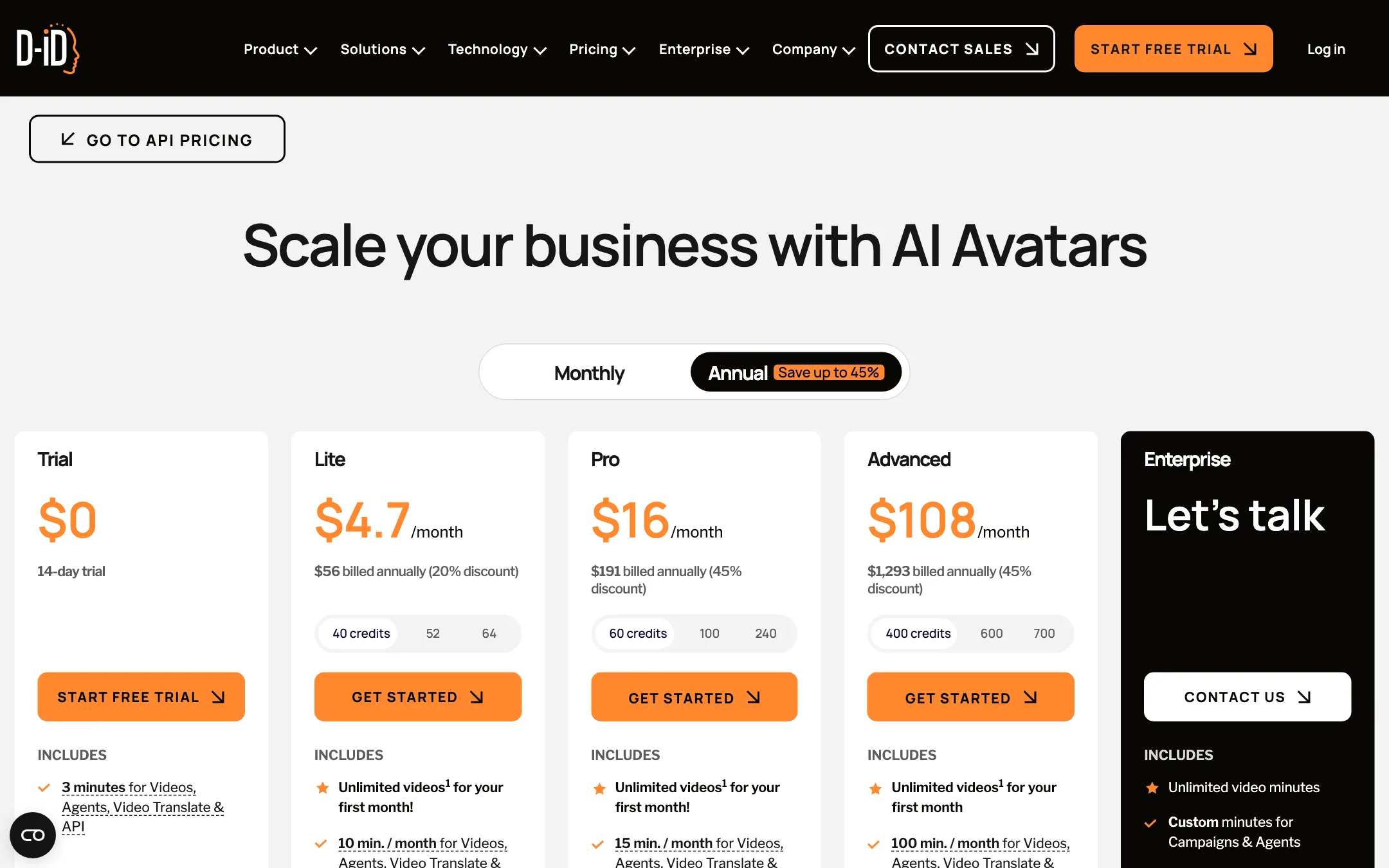
D-ID splits pricing into Studio plans for making videos and API plans for developers. Prices below were checked on 2026-10-19. The Studio page advertises up to 45% off for yearly billing.
| Plan | Price | What you get |
|---|---|---|
| Trial | Free, 14 days | 3 min, full-screen watermark, personal use |
| Lite | $4.70/mo yearly, $5.90 monthly | 10 min a month, D-ID watermark, personal use |
| Pro | $16/mo yearly, $29 monthly | 15 min a month, 3 personal avatars, 1 voice clone, commercial license |
| Advanced | $108/mo yearly, $196 monthly | 100 min a month, 5 personal avatars, 3 voice clones, custom logo |
| Enterprise | Custom | Unlimited video minutes, custom avatars, CSM |
Each paid Studio plan also shows a credit picker with higher tiers (for example Pro at 60, 100 or 240 credits), and the plan cards advertise unlimited videos for your first month under a fair-use policy.
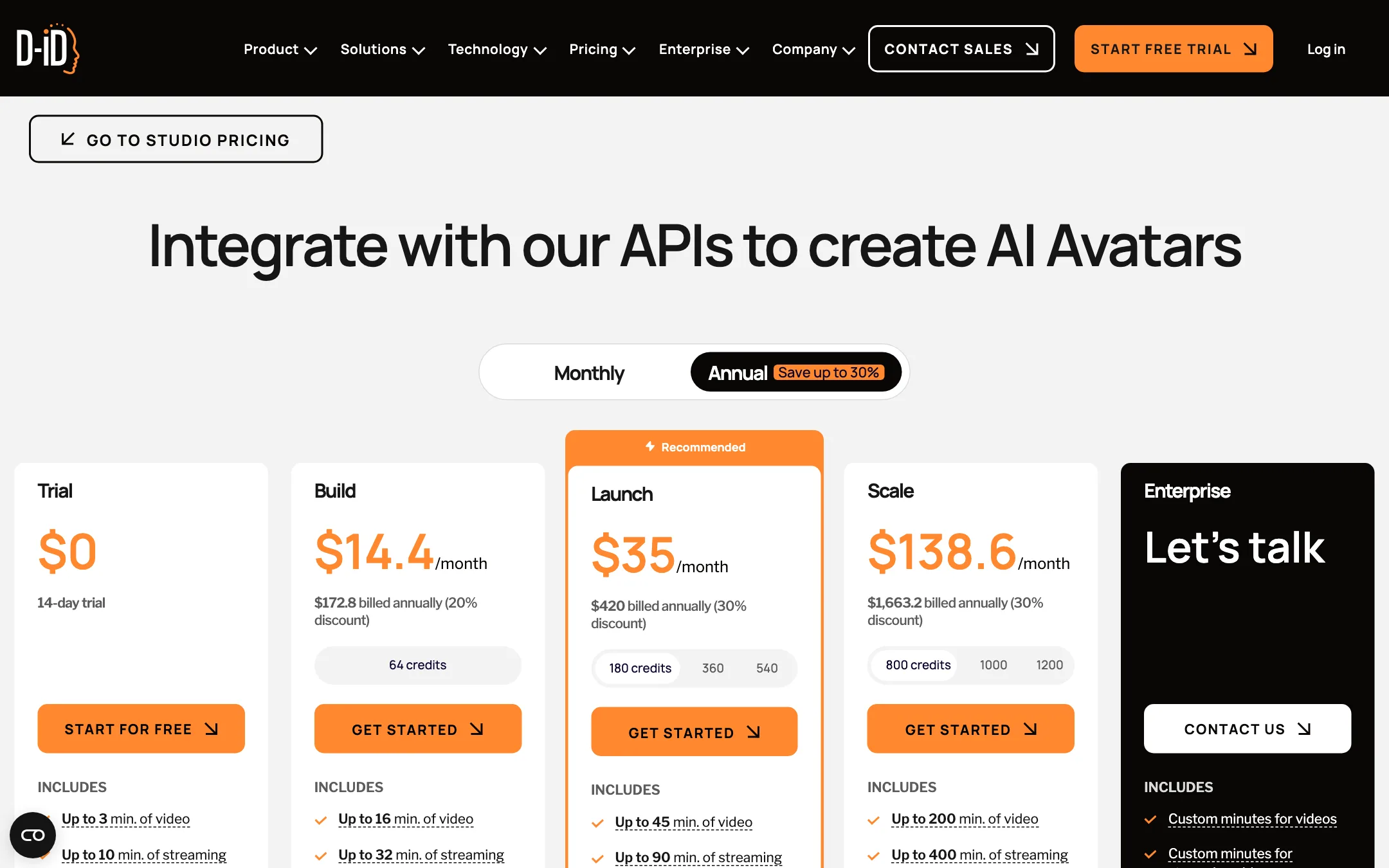
API plans start at Build, $14.40 a month billed yearly for up to 16 minutes of video. Launch is $35 a month billed yearly and Scale $138.60.
What the pricing page does not make obvious
- Minutes are shared. The monthly minutes cover videos, agents, video translation and API use together.
- Credits round up. One credit covers up to 15 seconds. A 40-second clip costs three credits, the same as 45 seconds. Keep this in mind for very short clips.
- Commercial use starts at Pro. Trial and Lite are personal licenses. If you are making marketing videos, Lite is not enough.
- Watermarks shrink but do not vanish. Lite has a D-ID watermark, Pro an AI watermark, and only Advanced lists a custom logo.
- Monthly billing costs much more. Pro goes from $16 to $29 and Advanced from $108 to $196 if you pay month to month.
Getting better results from D-ID
D-ID’s own guidance and the way credits work point to a few habits worth building:
- Start from a good photo. For talking photos, use a front-facing medium shot with even light, a neutral face and a closed mouth. Remove sunglasses, hats and anything covering the face. D-ID rejects images that break these rules, and borderline images tend to animate worse.
- Write for the ear. Short sentences and natural pauses make text-to-speech sound less robotic. D-ID’s FAQ covers adding pauses to the script.
- Use your own voice when it matters. If the video stands in for a real person, record audio or use a voice clone on Pro and up. A stock voice on a real person’s face can feel off to viewers who know them.
- Mind the 15-second blocks. Credits round up to the next 15 seconds. If you make many short clips, aim for lengths just under 15, 30 or 45 seconds.
- Pick the right avatar model. A V2 photo avatar is cheapest and fine for simple messages. Use a video-based V3 or V4 avatar when you need natural movement or sentiment.
- Check the license before you publish. Trial and Lite videos are for personal use. Move to Pro before you post marketing content.
Verdict
D-ID is the budget and developer pick in avatar video. You can animate any face, try the platform for under $6, and build real-time talking agents that most rivals cannot match. If you are building a product with a face on it, D-ID’s API, streaming and self-hosting options are the main reason to choose it.
For straightforward presenter videos at volume, the low plans run out fast. Fifteen minutes a month on Pro is tight, and commercial use needs Pro or higher. Use the 14-day trial to test your exact use case, then compare the cost per minute against Synthesia before you commit.
